Sun & Moon Position

iPhone / iPad · iOS 26.0+

The sun and moon, mapped.When and where, ahead of time.

Sunrise, sunset, twilight, moonrise and moon age, to the minute. Hold your phone to the sky and see the paths of the sun and moon over the scene. No ads, no account.

Scan with your iPhone

Sun & Moon Position

When it helps

What it does

  1. 01

    Paths over the live scene

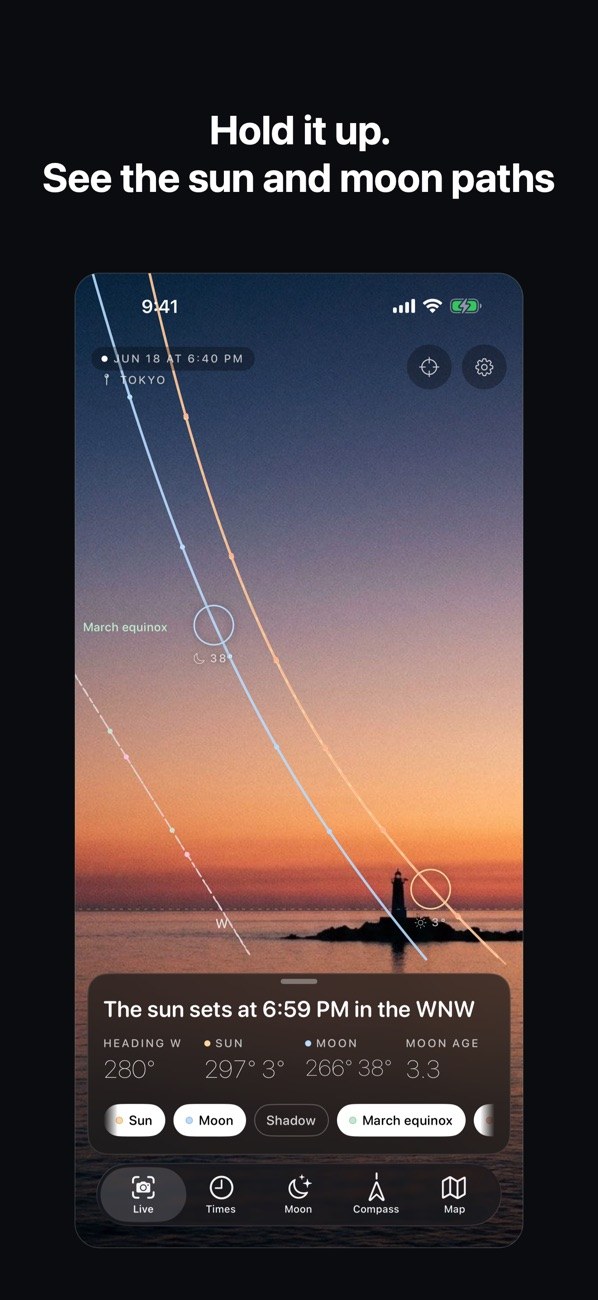
    The sun and moon positions and today's paths are drawn over the camera view, matched to your device's tilt and field of view. Works in landscape and on iPad (Pro).

  2. 02

    Sunrise to twilight

    Sunrise, sunset, solar noon, golden hour, blue hour and civil, nautical and astronomical twilight are listed together, each with a short "?" explanation.

  3. 03

    Moon phase, rise and set

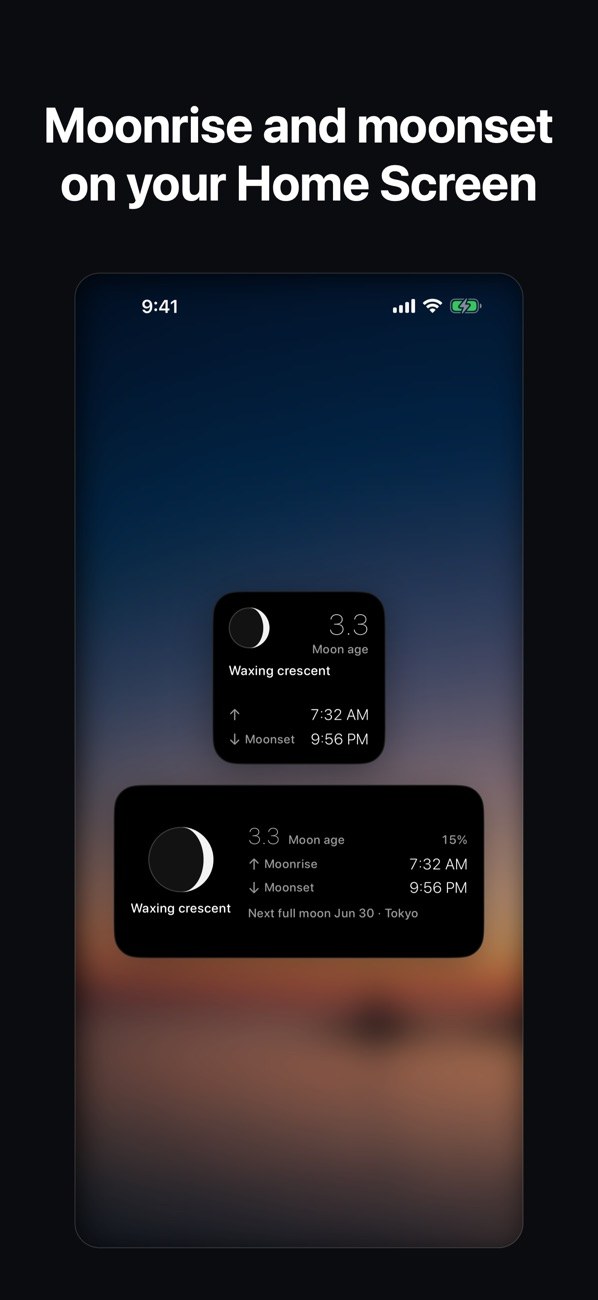
    See moon age, illumination, moonrise, transit and moonset, and the next full and new moon. A Home Screen widget shows today's moonrise and moonset too.

  4. 04

    Directions and shadows on a map

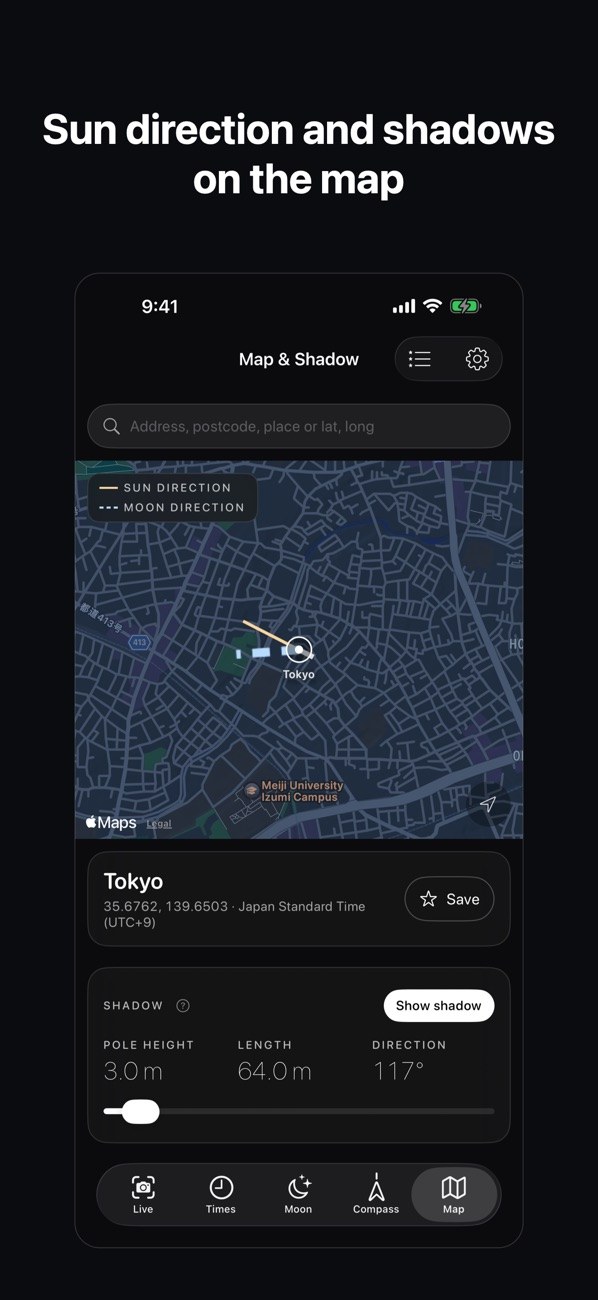
    The map draws the sun and moon directions as lines and shows the direction and length of a pole's shadow. Pick any spot by entering coordinates or pressing and holding on the map.

  5. 05

    Same results with no signal

    All calculations run on your device, so you get the same values in Airplane Mode. Your location is used only for calculations and is never sent to the developer.

  6. 06

    Plan ahead by date

    Jump to any date and time, search a year for when the sun or moon reaches a given direction, and get alerts for the full moon, golden hour and more (Pro).

In detail

Hold it to the sky and see the paths
01

Hold it to the sky and see the paths

Live view draws the sun and moon positions and today's paths over the camera image. The panel below lists the heading, the sun and moon azimuth and altitude, and the moon age. The heading is based on true north and drawn steadily, without flicker.

  • Live view (AR) is Pro
  • Toggle Sun, Moon, Shadow, Equinox, Solstice
  • Landscape and iPad supported
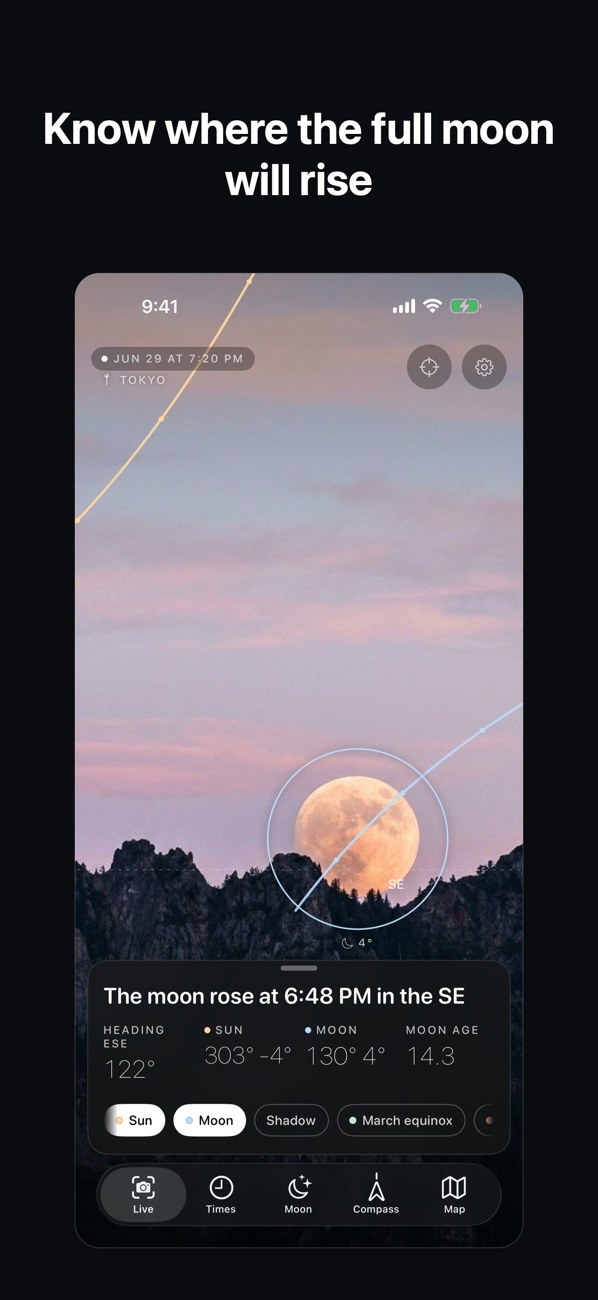
See where the moon will rise in advance
02

See where the moon will rise in advance

Change the date and time to see the direction and altitude of the moon at that moment over the live view. A sentence such as "The moon rose at 18:48 from the southeast" appears too.

  • Moon azimuth, altitude and age as numbers
  • Jumping to any date and time is Pro
Moon shape, moonrise and moonset
03

Moon shape, moonrise and moonset

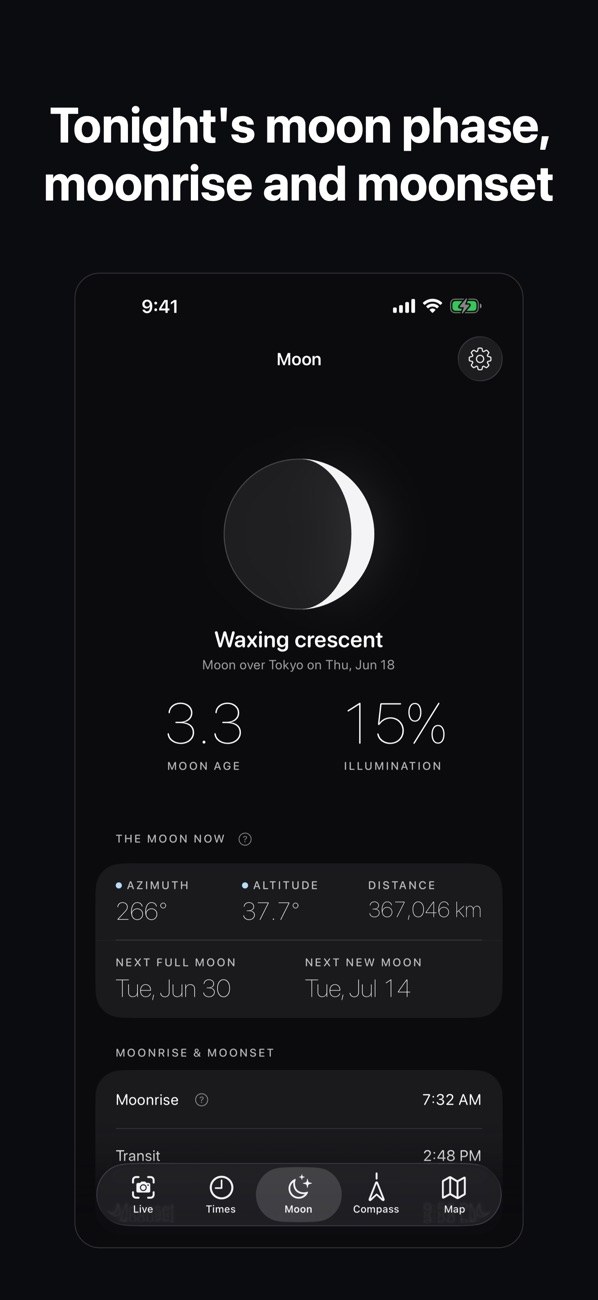
The Moon tab shows moon age, illumination, the moon's current azimuth, altitude and distance, and the next full and new moon. Moonrise, transit and moonset times are listed below.

  • Moon age and illumination
  • Dates of the next full and new moon
  • "?" explains each term
From sunrise to twilight, in order
04

From sunrise to twilight, in order

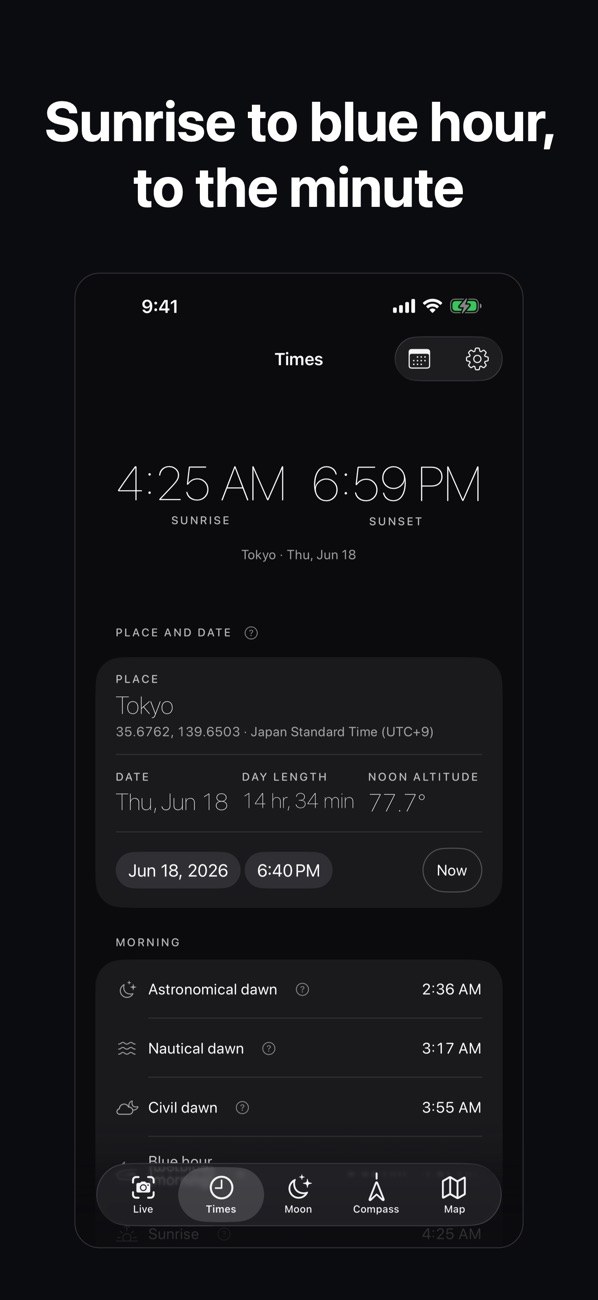
The Time tab shows sunrise and sunset large, then the place, date, day length and solar noon altitude. Astronomical, nautical and civil twilight times follow, each with a short "?" explanation.

  • Golden hour and blue hour
  • Shown in the place's time zone
  • Change the date and time to compare
Sun and moon directions and pole shadows on a map
05

Sun and moon directions and pole shadows on a map

The map draws a line for the sun's direction and another for the moon's. Set a pole height to see the shadow's length and direction. Search by address, postal code, place name or coordinates, or press and hold on the map to pick a spot.

  • Enter latitude and longitude directly
  • Saved places are Pro
  • Shadow points away from the sun; length = height / tan(sun altitude)
Moonrise and moonset on the Home Screen
06

Moonrise and moonset on the Home Screen

The widget shows today's moonrise, moonset and moon age. The larger size also shows illumination and the date of the next full moon.

  • Two widget sizes
  • Moon phase icon
  • Free

How it works

  1. 1
    Pick a place

    Pick a place

    Allow location and the app calculates for where you are. If you do not, it shows values for Tokyo. You can also enter coordinates or press and hold on the map to pick another place.

  2. 2
    Look up times and the moon

    Look up times and the moon

    Use Times for sunrise, sunset and twilight, and Moon for moon age, moonrise and moonset.

  3. 3
    Hold your device up in Live view

    Hold your device up in Live view

    Allow the camera and raise your device, and the sun and moon positions and paths appear over the scene (Pro).

  4. 4
    Check Map & Shadow

    Check Map & Shadow

    Use Map & Shadow to see the sun and moon directions and the direction and length of a pole's shadow.

Screens

Sun and moon paths over the live view
Where and when the moon rises
Moon age, illumination, rise and set
Sunrise, sunset and twilight times
Directions and a pole's shadow on a map
Moonrise and moonset widget

FAQ

What is free?

Sunrise, sunset, solar noon, golden hour, blue hour, twilight, moonrise, moonset, moon age and illumination, the next full and new moon, the compass, Map & Shadow, and the Home Screen widget are all free.

What does Pro add?

Live view (AR), overlaying solstice, equinox, monthly and chosen-date paths, jumping to any date and time with a monthly moon phase calendar, searching for when the sun or moon reaches a direction, address and place search with saved places, and alerts for full moon, golden hour and similar events.

Does it work without an internet connection?

Yes. All calculations run on your device and give the same values in Airplane Mode. Only address and place search needs a connection, because it uses Apple's map search. Entering coordinates works offline.

Is my location sent anywhere?

No. Your location is used only for calculations on your device and is never sent to the developer. Address search uses Apple's map search.

What if I do not allow location access?

The app shows values for Tokyo. You can enter coordinates to look up other places. The true-north compass and Live view need location.

Is the camera image saved?

No. The camera is used only in Live view to draw the paths over the scene. The video is neither saved nor sent.

What if the compass seems off?

When accuracy is poor, the app tells you to move the device in a figure-8 instead of hiding it. If the sun in Live view does not line up with the on-screen mark, you can nudge it by 1° at a time.

What does it cost?

The app is free and the free features stay free. Pro is offered as Monthly, Yearly or Lifetime. Monthly and Yearly include a 3-day free trial, once per person. Your local price is shown before you buy, and Family Sharing is supported.

See where the next full moon will rise.

Download on the App Store
Sun & Moon PositionGet